How to Do a Content Gap Analysis with SERPrecon
Written by: Ryan Jones
Get Started with SERPrecon
Get Started for FreeHow to Do a Content Gap Analysis (with SERPrecon)
Most content gap analyses answer one question: which keywords do my competitors rank for that I don't? That's useful. But it skips the more common problem, which is the page you already have, sitting on page two, missing something every page above it covers.
That's the gap I care about most, because it's the one you can fix this week. And with AI answers now pulling passages from the pages that rank, a gap on your page is also a gap in whether ChatGPT or Google's AI Overview cites you.
SERPrecon does that comparison for you and turns it into an action plan.
What is a content gap analysis?
A content gap analysis is the process of finding the topics, terms and questions your competitors cover that your content doesn't, so you can close the difference. There are two kinds:
Site-level gaps: topics you have no page for at all. These come from comparing keyword lists across domains.
Page-level gaps: you have a page for the topic, but it's missing what the ranking pages have in common. These come from comparing your page against the search results for one query.
Most tools are built for the first kind. SERPrecon is built for the second, and it can feed the first.
Why a keyword list isn't enough
A keyword gap report tells you a competitor ranks for "standing desk weight capacity" and you don't. It doesn't tell you why your standing desk guide ranks eighth for the head term, or whether adding that section would even help.
Not every gap is a content gap, either. Sometimes the page covers everything and still loses, because Google wants a product list and you wrote a how-to, or because every page above you has far more authority. Writing 800 more words won't fix either of those. A useful gap analysis tells you which kind of gap you have before you start writing.
TLDR: find out whether the gap is content, intent or authority first. Then fix the right one.
How to run a content gap analysis in SERPrecon
Here's the process I use.
1. Create a report for the query and the page
Pick one query and the page you want to rank for it. In SERPrecon, create a report with the search query, the page (a path or full URL), and the language, location and device you care about.
Then pick the search engine: Google, Bing or ChatGPT. For ChatGPT, the pages its answer cites stand in for the search results, so you're comparing yourself against the sources ChatGPT actually uses. If AI visibility matters to you, run the same query on Google and ChatGPT and compare the two.
2. Read the "Biggest gap" first
The Overview section starts with Where to focus. SERPrecon compares your page with the SERP average and tells you the biggest gap: Content, Intent or Authority.
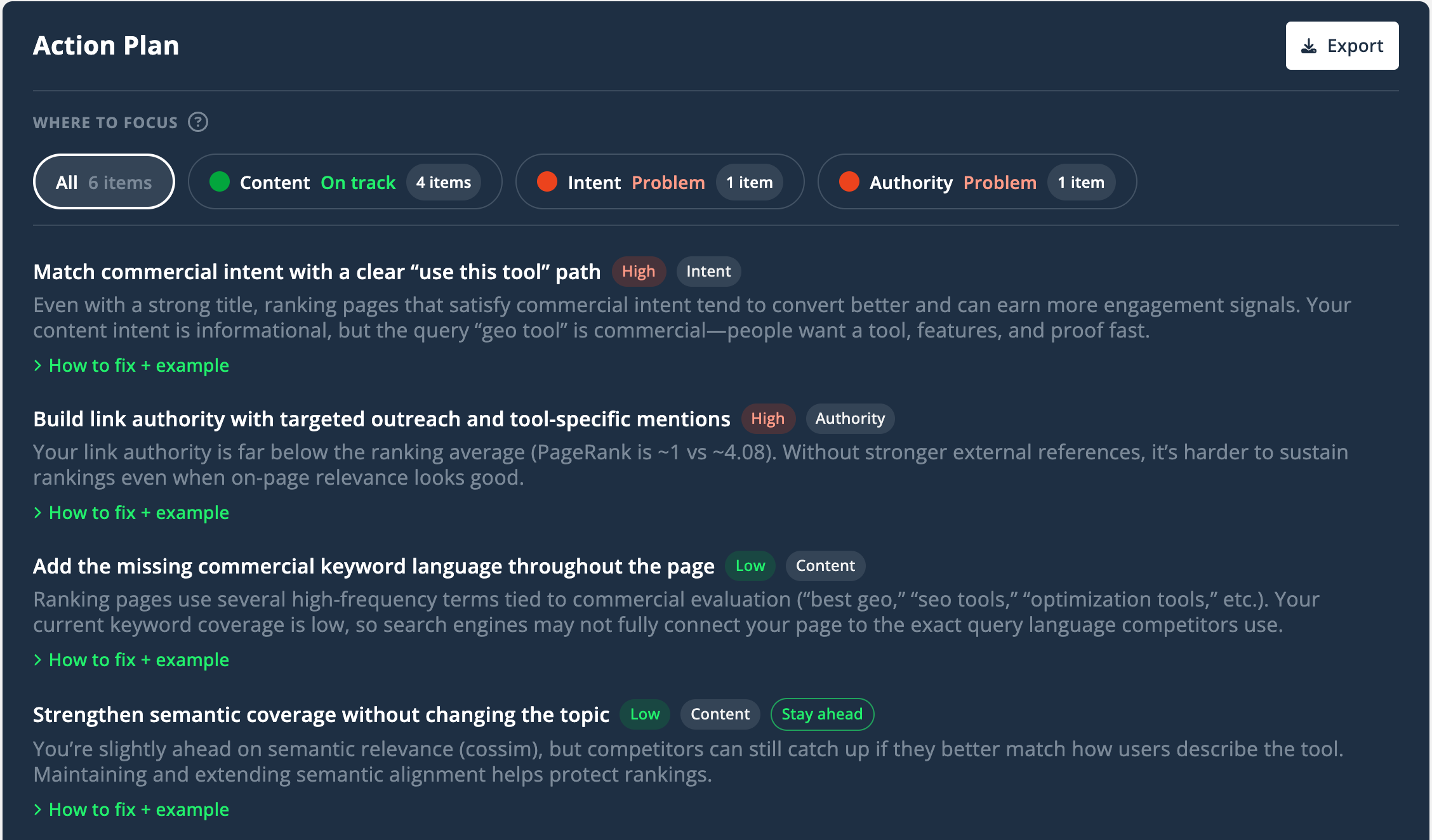
This is the step people skip, and it saves the most time. If the biggest gap is Intent, your page doesn't match the type of page that ranks, and adding keywords won't change that. If it's Authority, the content may already be good enough, and the work is links and trust. If it's Content, keep going.
3. Find the missing keywords and phrases
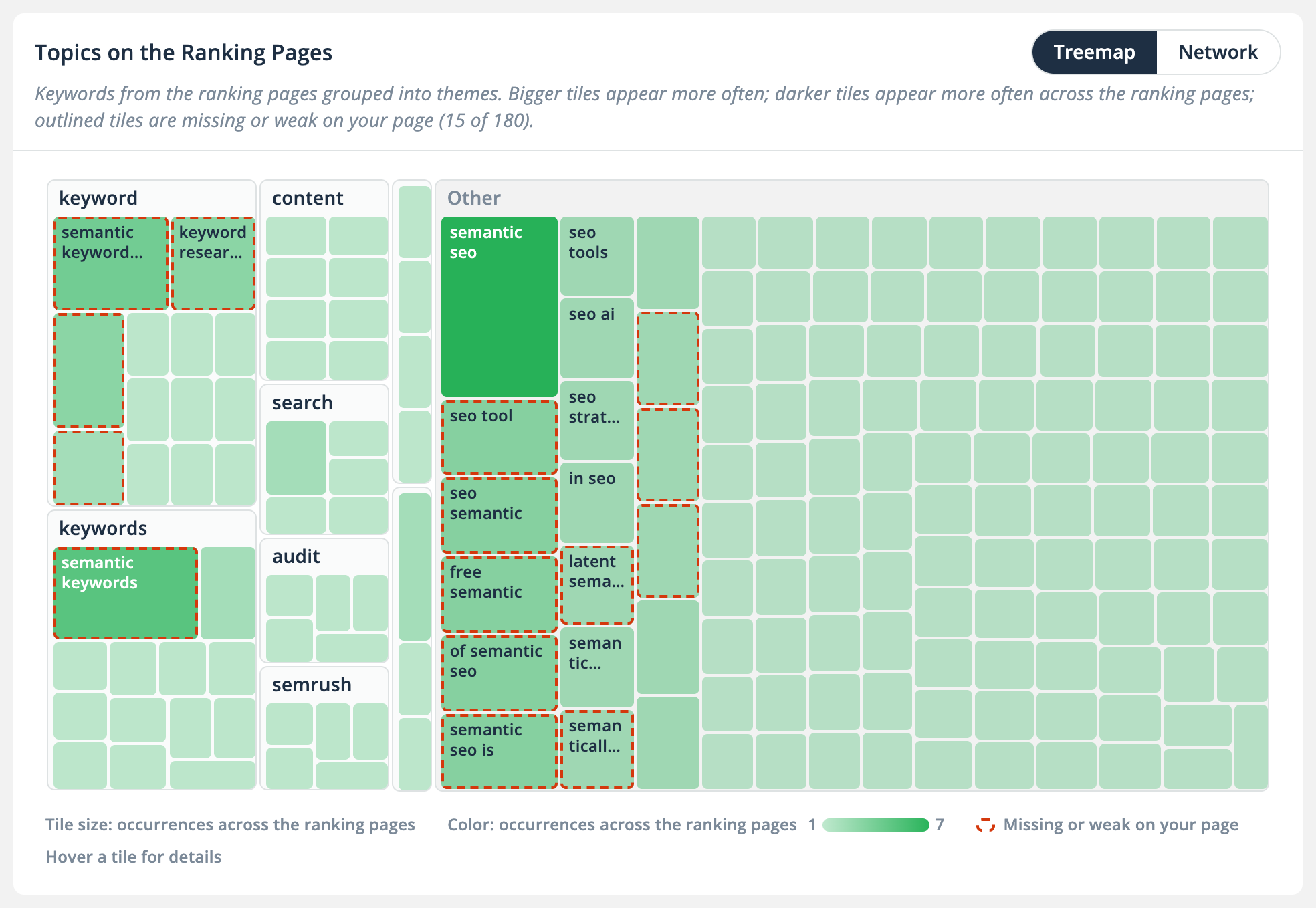
Open Keywords & Topics. Start with the topic treemap of what the ranking pages cover. It groups the ranking pages' keywords into themes: bigger, darker tiles show up more often across the ranking pages, and tiles outlined in red are missing or weak on your page. It's the fastest way to see your gaps at a glance.
Then go through the list. Keywords to Improve lists the terms your competitors score as highly relevant for where your page scored low. That's your core gap list.
Compare Ranking Site Keywords with Your Content Keywords to see the vocabulary the ranking pages share that yours doesn't. Bigram NPMI surfaces two-word phrases that tend to appear together on the ranking pages, which is often where the real subtopics hide ("motor noise," "weight capacity," "cable management").
Don't just paste these in. Each missing term is usually a missing idea. Ask what question the term answers, and whether your page answers it.
4. Check the entities
Search engines don't just match words, they match things. Entities & Topics shows the Knowledge Graph Entities for the query next to the Entities from Your Page. If the ranking pages consistently mention a brand, standard, person or concept that you never name, that's a gap in topical coverage, and it's one that keyword tools usually miss. (More on that in What Is Semantic SEO?.)
5. Check intent and the title
Title & Intent compares your title intent and copy intent with the pages that rank, and shows how well your title tag matches the query. Google Title Tag Rewrites shows when Google is replacing titles on the SERP, which is a strong hint that the titles don't match what searchers want.
6. Measure relevance against the SERP average
Content Relevance shows how your page scores on BM25 (keyword relevance), cosine similarity (semantic relevance), topical coherence, title/body alignment and word count, each compared with the ranking pages. If you're behind on BM25 but fine on cosine similarity, you cover the meaning but not the words people search with. If it's the other way around, you have the words but no passage that really answers the query. (Here's how those two scores work.)
When the gaps are big, Generate Content Outline gives you a structure built from what the ranking pages cover.
7. Pull the questions from the SERP
SERP Features shows the related searches and People Also Ask questions for the query. Every question there that your page doesn't answer is a gap, and each one is a natural H2 or H3.
8. See what AI answers cite
The AI Overview section shows the Google AI Overview and the ChatGPT answer for the query. Read them for two things: which pages they cite, and which points they make that your page doesn't. If an AI answer makes a claim that nothing on your page supports, you can't be the source for it.
To go wider, run GEO Query Fanout on the query. AI answers are built from many hidden sub-searches, and fan-out research shows the subtopics the cited pages cover, with search volumes. Those sub-queries are gaps that never show up as a single keyword. (What query fan-out is, and why it matters.)
9. Export the action plan and close the gaps
Back in Overview, each issue comes with how to fix it and an example. Export action plan downloads it as CSV, JSON or Markdown, so it can go straight to your AI agent or content writer. Or, use our API and have Claude Code or Codex grab it directly.
Before you publish, paste the new draft into Check Relevance to confirm the gaps are closed without stuffing the same terms over and over.
10. Re-run and compare
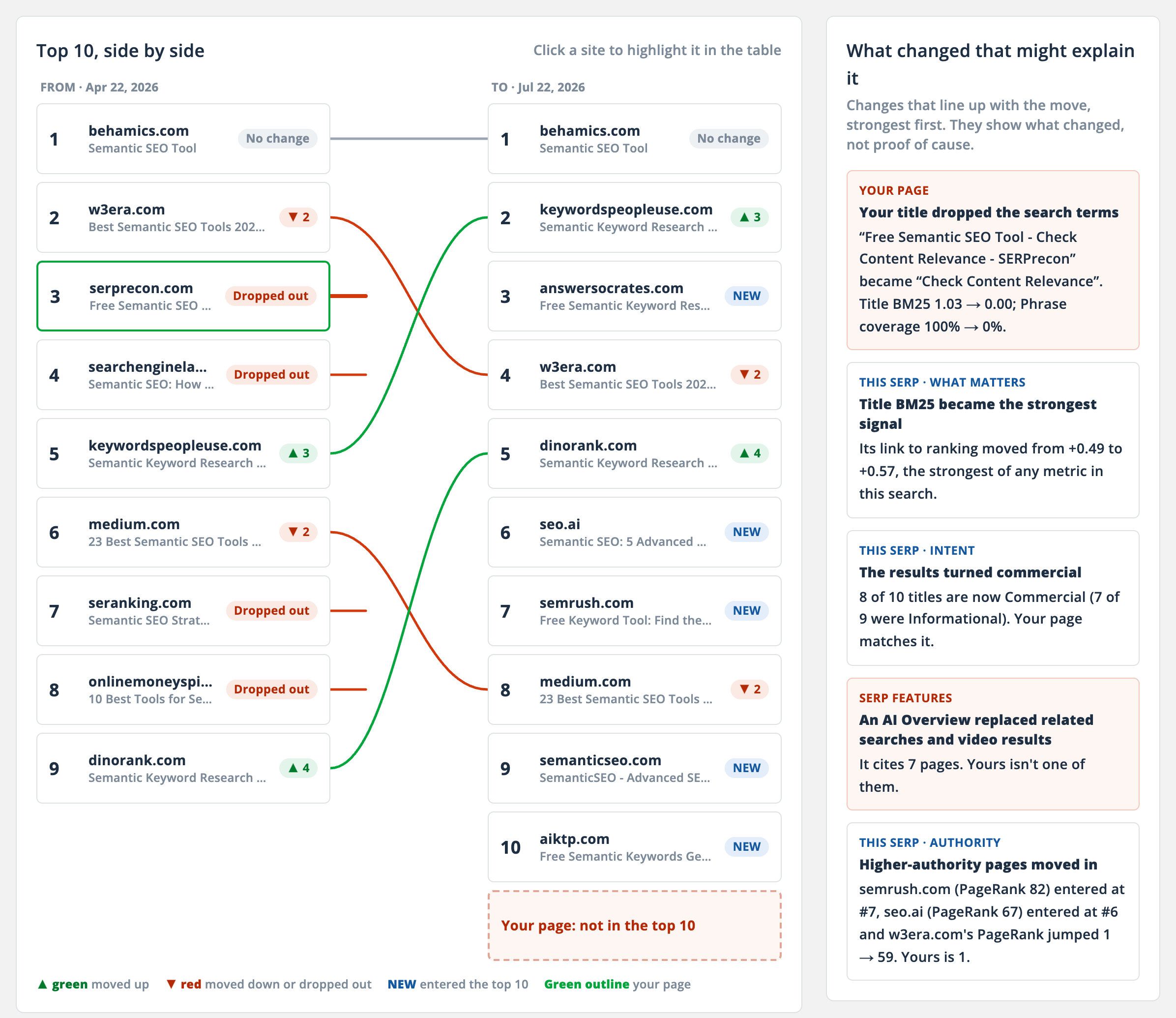
Once the update is live and indexed, re-run the report (or set it to run weekly). Compare Runs shows how much the SERP moved, what Google wants now, the top 10 side by side, what started mattering, and whether your page is now cited in the AI Overview. That's how you tell whether closing the gap worked, instead of guessing.
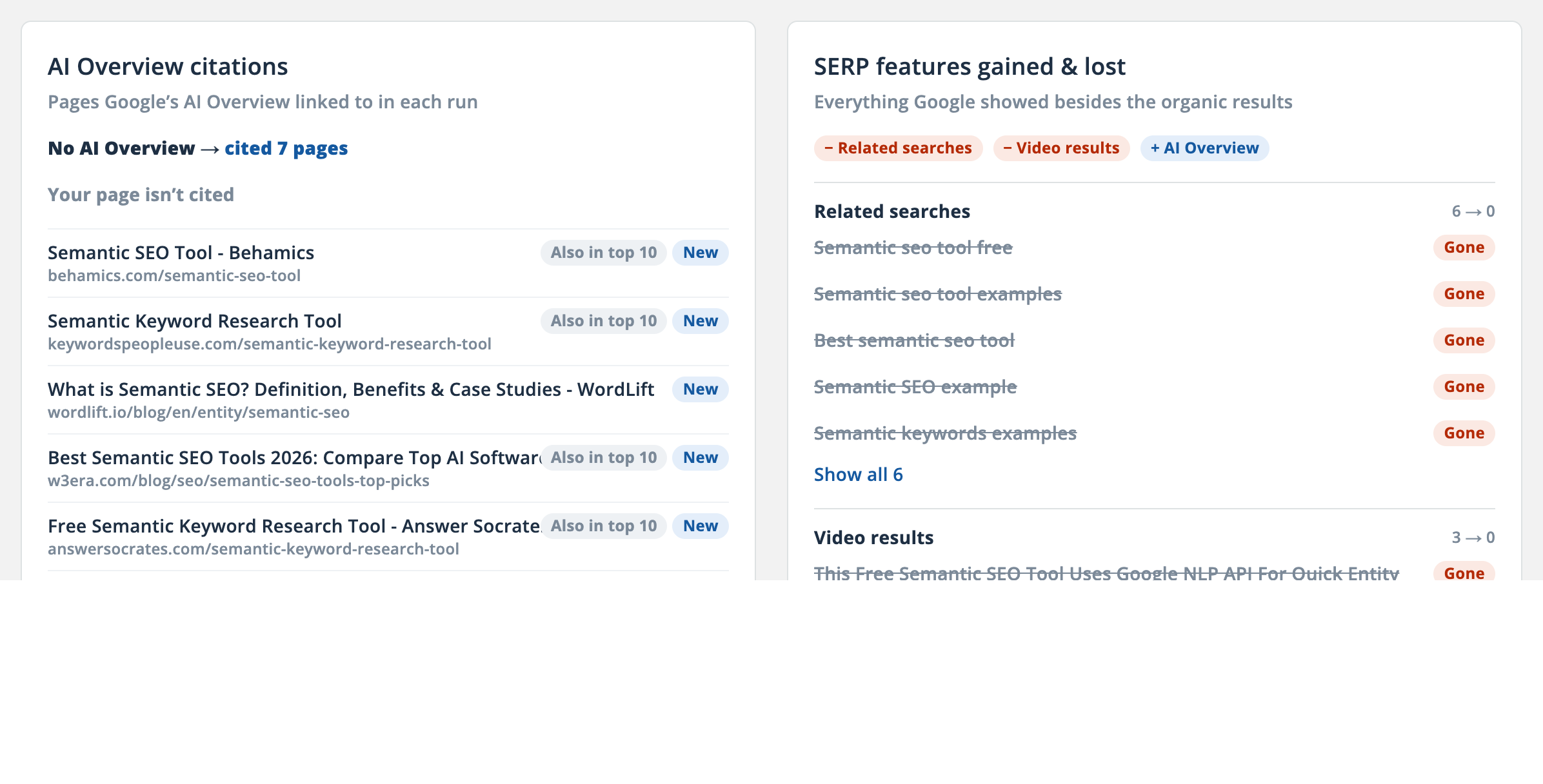
It also shows which pages the AI Overview cited in each run and which SERP features appeared or disappeared, so you can see whether your page joined the cited sources or someone else took the spot.
Don't stop at filling gaps
Here's the trap: if you close every gap, your page now says exactly what the other nine pages say. That's commodity content, and there's no reason for a search engine or an AI answer to prefer it. SERPrecon's Commodity Score (in Authority & Quality) shows how much your page overlaps with the rest of the SERP.
So treat the gap list as the floor, not the goal. Cover what the SERP expects, then add what it doesn't have: your own data, tests, examples and opinions. Those are the passages that get cited.
TLDR: gaps get you considered. Something original gets you chosen.
Going site-wide: gaps across a whole topic
Once your priority pages are in shape, zoom out. A Share of Voice report tracks a set of keywords for your domain across Google, AI Overviews, ChatGPT and Perplexity. It shows which keywords you're cited for, which pages AI cites instead of yours, and who's winning each one. Keywords where competitors get cited and you don't are site-level gaps, and often a sign you need a new page rather than a better one.
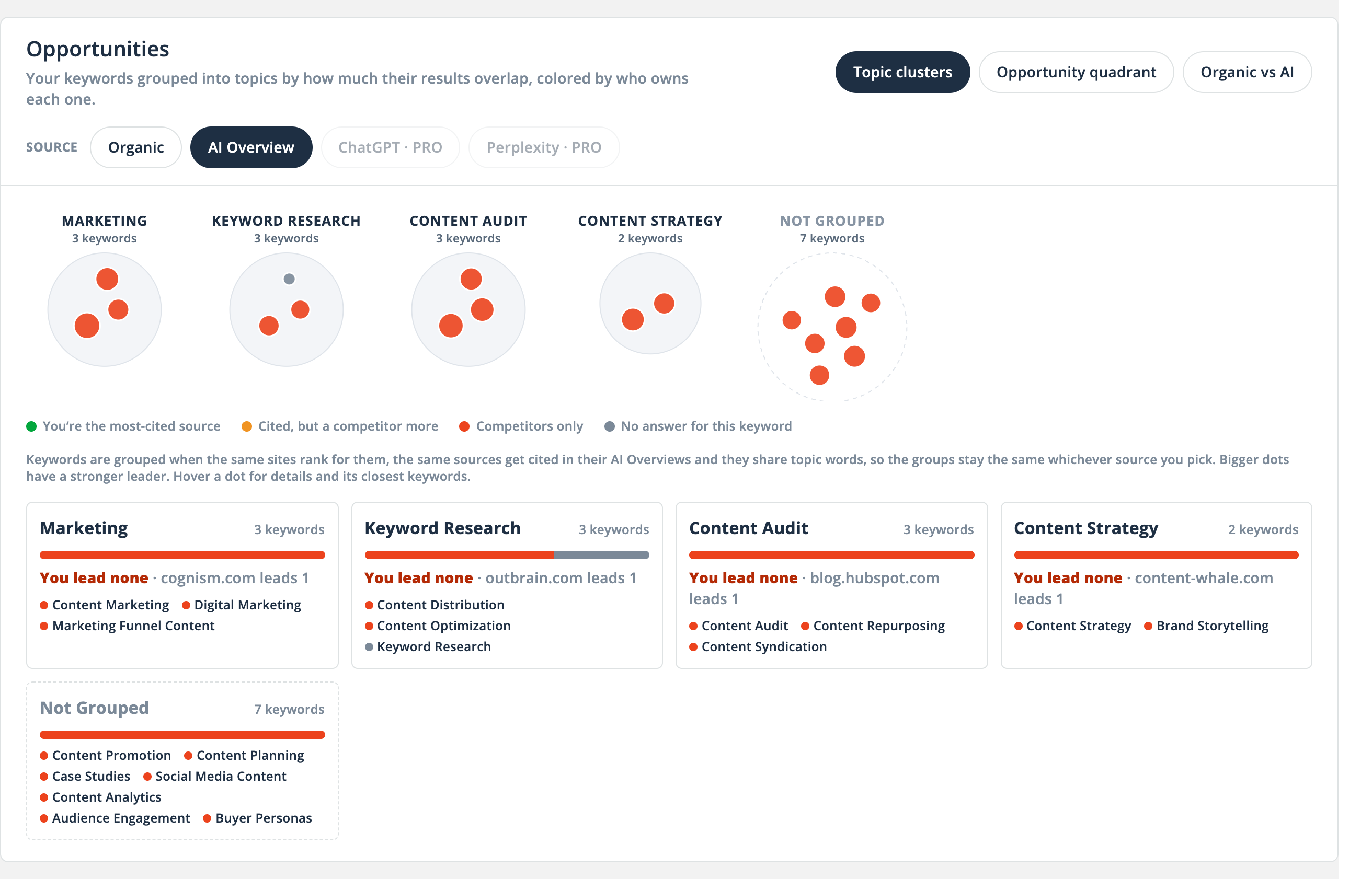
The Opportunities view makes those gaps easy to spot. It groups your keywords into topics by how much their results overlap, and colors each keyword by who owns it, in organic results or in AI answers. A cluster that's all "Competitors only" is a topic you're missing entirely.
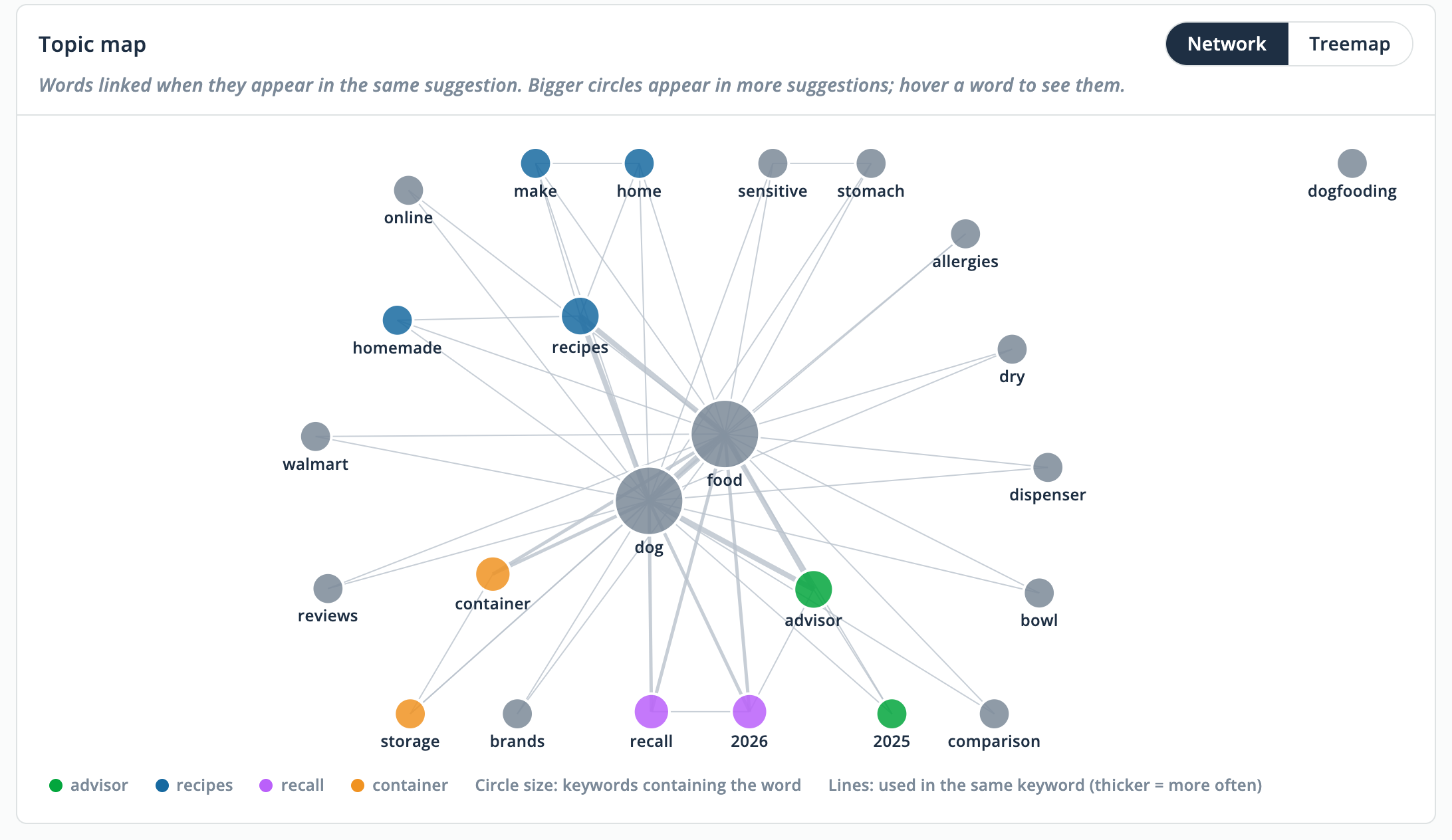
For planning, the free Query Explorer shows what Google and Bing suggest as people type, and where the two disagree, so you can spot topics you haven't covered yet. Its topic map links the words that show up together in those suggestions, which is a quick way to see the subtopics people care about.
The takeaway
A good content gap analysis doesn't hand you a list of keywords. It tells you what kind of gap you have, what the ranking pages and AI answers cover that you don't, and whether fixing it worked. Start with the biggest gap, close the content gaps that matter, add something the SERP doesn't have, and measure the result.
In our award-winning case study, that's how a specialty ecommerce retailer went from a 0% to 37% AI citation rate on priority queries in 90 days: SERPrecon found 83 semantic gaps competitors covered and the retailer didn't, and closing them won citations across Google AI Overviews, ChatGPT and Perplexity.
Find the gaps on your own page. Start a 7-day free trial of SERPrecon (no payment method required) and run a report on the page you most want to rank.