Free Semantic SEO & Topical Relevance Chrome Plugin
Extract keywords. Find most relevant snippets. Score semantic relevance of page content and titles. Measure AI readiness and extract key SEO values from pages. (Please read install instructions below to enable Gemini) Download SERPrecon from the Chrome store.
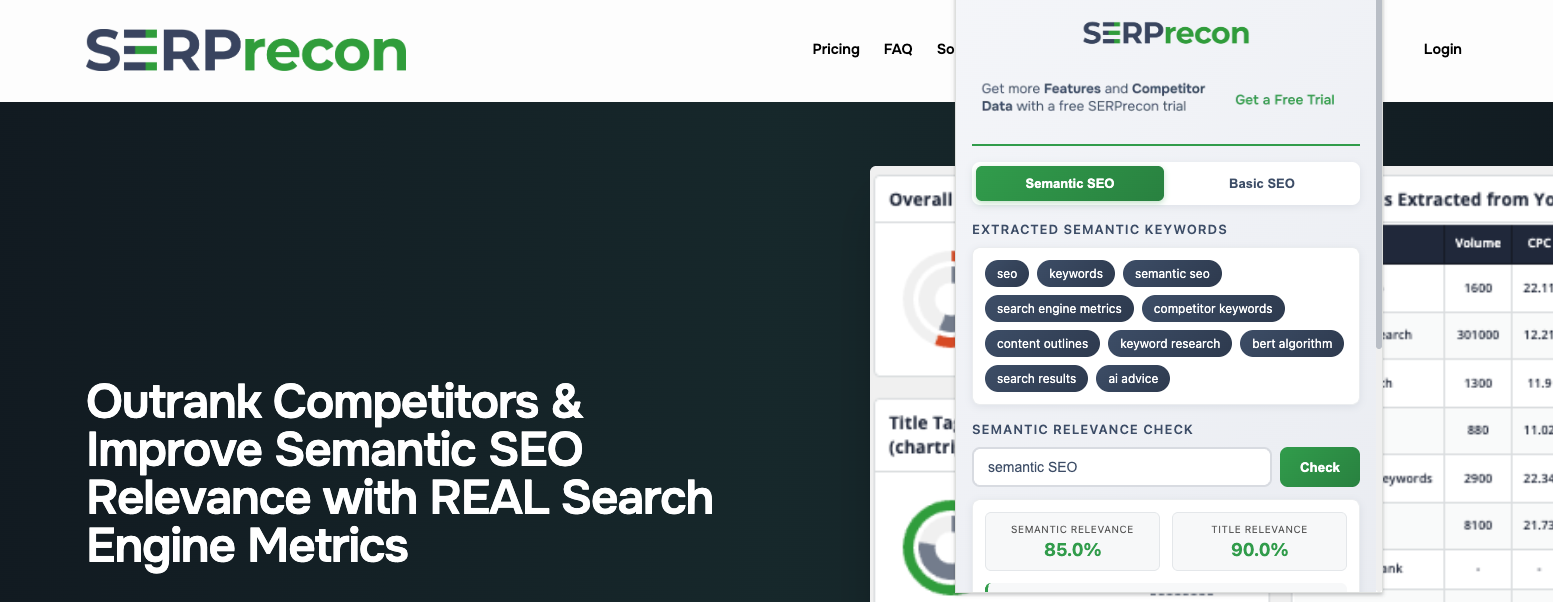
See the plugin in action
Check out the free SERPrecon semantic SEO plugin in action in this short video.
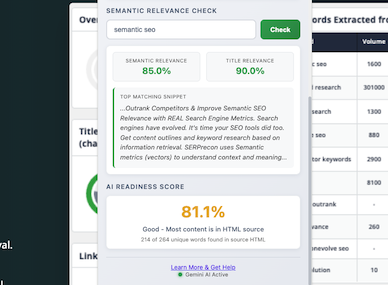
Semantic Relevance Scores for any keyword!
Enter a keyword and SERPrecon will score the current webpage copy & title tag for semantic relevance to the topic (using cosine similarity.) We also show you how much of your copy is visible to AI crawlers.
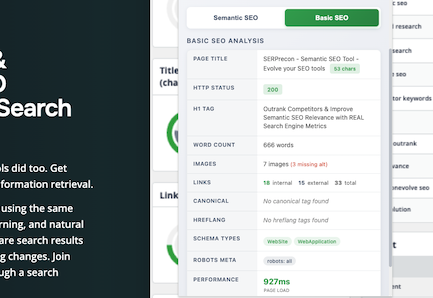
Complete SEO Data
In addition to semantic and topical scores, the "basic SEO" tab shows all the important SEO meta data and page scores as well - so all the important SEO components are easily readable in one place.
Download the SERPrecon Plugin
Installation Instructions & Troubleshooting
SERPrecon works best when Chrome's built it AI model is enabled. In some versions this is not enabled by default. If the bottom of your plugin says "using fallback" it means you're not using the most powerful analysis method (Chrome's built in AI.) To enable it, follow the instructions below.
1. Check Requirements
Ensure your browser and hardware are ready:
Version: Chrome 137 or higher (Check Version)
Storage: 22 GB free disk space.
Hardware: 4 GB VRAM (Video RAM) recommended.
2. Enable Chrome Flags
You must enable two experimental settings to run the local model. The extension will work without this, however to get the full value you should enable Chrome's built in AI model.
Open chrome://flags
Enable #prompt-api-for-gemini-nano
Enable #optimization-guide-on-device-model (Select Enabled BypassPerfRequirement)
Click Relaunch at the bottom.
3. Download the Model
Force Chrome to download the Gemini Nano engine:
Go to chrome://components
Find Optimization Guide On Device Model.
Click Check for update.
Wait until it says "Up to date" (Version should not be 0.0.0.0).
Still not working? Go to chrome://on-device-internals, select the Model Status tab, and set all values to True. Restart Chrome.
Privacy Policy
Last Updated: January 7, 2026
SERPrecon LLC ("we," "us," or "our") operates the SERPrecon Chrome extension. We are committed to protecting your privacy. This Privacy Policy explains our practices regarding data when you use our browser extension.
1. No Data Collection
The SERPrecon extension does not collect, store, or transmit any personal information or user data.
We do not collect your name, email address, IP address, or browsing history.
We do not use cookies or tracking pixels.
We do not use any third-party analytics (like Google Analytics).
2. Local Analysis Only
The extension works by analyzing content directly on the webpages you visit. This analysis happens entirely within your local browser.
No data from the pages you visit is ever sent to our servers or any third-party servers.
All processing is "client-side," meaning it stays on your computer.
3. No Data Sharing
Because we do not collect any data, we have no data to sell, trade, or share with third parties.
4. Permissions
The extension requires certain browser permissions (such as activetab or hostpermissions) to function. These permissions are used solely to allow the extension to analyze the content of the page you are currently viewing as intended by the extension’s features.
5. Changes to This Policy
We may update this Privacy Policy from time to time. Any changes will be posted on this page with an updated "Last Updated" date.
6. Contact Us
If you have any questions about this Privacy Policy, please contact us using this website's contact form.